

Are you finding it hard to make your website more visible online? Boosting online visibility is key in today’s digital world. The right tools can really help.
Efficient SEO strategies are easier to find with Chrome SEO software. It makes your work easier and gives you insights. This way, you can improve your website’s ranking on search engines.
The best SEO Chrome extensions can put you ahead of others. They can make your online presence stronger.
Key Takeaways
- Discover the most beneficial SEO Chrome extensions to enhance your online visibility.
- Learn how to streamline your workflow and gain valuable insights.
- Optimize your website for better search engine rankings.
- Stay ahead of the competition with the right Chrome SEO software.
- Supercharge your SEO strategy with these powerful tools.
The Power of SEO Chrome Extensions for Digital Success
SEO Chrome extensions have changed the game in digital marketing. They give you quick access to important data and insights. These tools are key for digital marketers and SEO experts to boost their work and online presence.
How Browser Extensions Transform Your SEO Workflow
Browser extensions make tasks like keyword research and competitor analysis easier. They automate these tasks, saving you time and effort. This lets you focus more on strategy and creating great content.
Instant Data Access and Analysis Benefits
SEO Chrome extensions let you get to critical data right from your browser. This means you can analyze web pages, track keyword rankings, and keep an eye on competitors without leaving your browser.
Budget-Friendly Alternatives to Premium SEO Tools
Many SEO Chrome extensions offer great features without costing a lot. This makes them perfect for small businesses and solo marketers. They help you improve your SEO without spending a lot of money.
| Extension | Primary Function | Cost |
|---|---|---|
| Keywords Everywhere | Keyword Research | Free |
| SEOquake | SEO Audit | Free |
| Ahrefs SEO Toolbar | Backlink Analysis | Freemium |
Essential SEO Chrome Extensions for Keyword Research
Keyword research is key to a good SEO plan. The right Chrome extensions can really help. They give you insights into search volume, competition, and trends. This boosts your site’s search engine ranking.
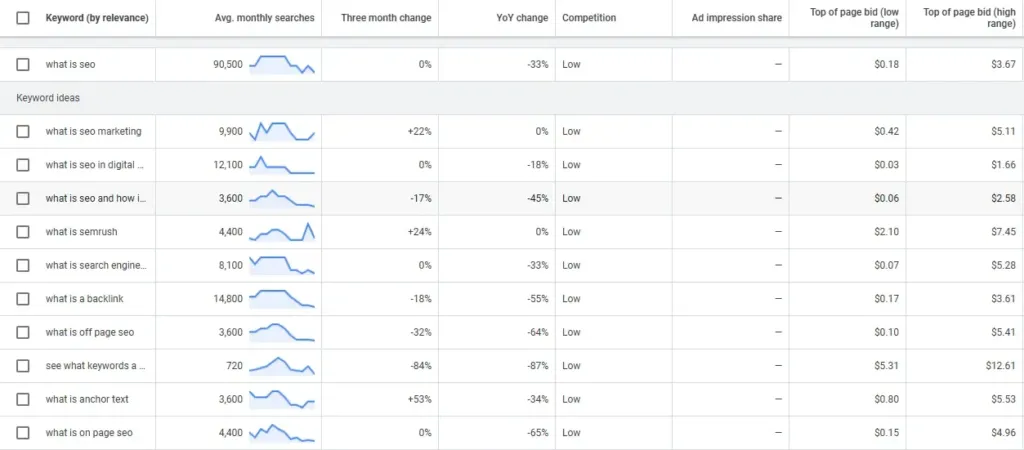
Keywords Everywhere: Uncover Search Volume and Competition Data
Keywords Everywhere is a top Chrome extension. It shows search volume, competition, and related keywords instantly. You can use it right from your current page, making your keyword strategy better.
Ubersuggest: Generate Keyword Ideas and Content Suggestions
Ubersuggest is great for finding keywords and content ideas. It suggests keywords and topics that can bring more visitors to your site.
Keyword Surfer: Analyze SERPs and Find Related Terms
The Keyword Surfer extension lets you check Search Engine Results Pages (SERPs) in your browser. It shows related terms and keyword chances. This is key for making your content match what users search for.
TubeBuddy: Optimize YouTube Content and Discover Trending Topics
TubeBuddy is a must-have for YouTube creators. It optimizes your video titles, tags, and descriptions. It also finds trending topics and keywords, helping your videos get found more easily.
Using these SEO Chrome extensions can really boost your keyword research. This leads to better SEO strategies and more visibility online.
Top Technical SEO Chrome Extensions for Site Analysis
To stay ahead in SEO, using top technical SEO Chrome extensions is key. Technical SEO helps search engines crawl, index, and rank your site well. The right Chrome extensions offer insights into your site’s performance, accessibility, and SEO.
Lighthouse: Audit Performance, Accessibility, and SEO Metrics
Lighthouse, developed by Google, audits your site’s performance, accessibility, and SEO. It gives a detailed report with scores and tips for bettering your site. With Lighthouse, you can spot areas for improvement like page load times and mobile responsiveness.
Key Features of Lighthouse:
- Performance auditing
- Accessibility analysis
- SEO metric evaluation
- Actionable improvement suggestions
SEOquake: Examine On-Page Factors and Domain Strength
SEOquake is a vital Chrome extension for technical SEO analysis. It lets you check on-page factors like keyword density and meta tags. It also evaluates domain strength with metrics like Google PageRank and Alexa Rank.
SEOquake’s capabilities include:
- On-page SEO analysis
- Domain strength evaluation
- Competitor analysis
- Keyword research tools
META SEO Inspector: Review and Fix Metadata Issues
The META SEO Inspector Chrome extension helps fix metadata issues on your site. It checks metadata like title tags and meta descriptions and offers tips for improvement. Optimizing your metadata is key for better search rankings.
“Metadata is a critical element in SEO, as it helps search engines understand your webpage’s content and relevance.” – SEO Expert
Web Developer: Analyze Page Structure and Technical Elements
The Web Developer Chrome extension is a versatile tool for analyzing your site’s structure and technical elements. It lets you inspect HTML elements, view CSS styles, and validate HTML and CSS.
| Chrome Extension | Primary Function | Key Benefits |
|---|---|---|
| Lighthouse | Audit performance, accessibility, and SEO | Comprehensive reports, improvement suggestions |
| SEOquake | Analyze on-page factors and domain strength | Keyword density analysis, domain strength metrics |
| META SEO Inspector | Review and fix metadata issues | Metadata analysis, optimization recommendations |
| Web Developer | Analyze page structure and technical elements | HTML inspection, CSS validation, technical analysis |
By using these essential SEO Chrome extensions, you can greatly improve your technical SEO. This will make your website healthier and boost your search rankings.
Free SEO Chrome Extensions for Content Optimization
Using the right tools is key to better content. Free SEO Chrome extensions can give you an edge. They help make your content better for SEO.
Grammarly: Enhance Content Quality and Readability
Grammarly checks your writing for errors. It also offers tips to make your sentences clearer. This makes your content more engaging and easy to read.
Hemingway Editor: Simplify Writing and Improve Clarity
The Hemingway Editor makes your writing easier to understand. It highlights complex sentences and suggests simpler ones. It also gives a readability score to help you see how clear your content is.
WordCounter Plus: Track Word Count and Reading Time
WordCounter Plus tracks your word count and reading time. Knowing this helps you tailor your content to your audience. It makes sure your content fits what your readers want.
Surfer SEO: Optimize Content Against Top-Ranking Pages
Surfer SEO compares your content to top pages for your keywords. It gives tips to make your content more visible and ranked higher. This helps your content compete with the best.
Adding these free SEO Chrome extensions to your workflow can greatly improve your content. They offer many features to help optimize your content. This makes creating high-quality content easier and more effective.
Must-Have SEO Chrome Extensions for Competitor Analysis
SEO competitor analysis is key, and the right Chrome extensions help a lot. They give you the data to stay ahead. Knowing what your competitors do can help you find gaps and opportunities to improve your SEO.
SimilarWeb: Uncover Traffic Sources and User Behavior
SimilarWeb is a top tool for seeing how your competitors’ websites do. It shows where their traffic comes from and how users behave. This info helps you make a better SEO plan by seeing what works for others.
Key Features:
- Traffic analysis and sources
- User behavior insights
- Competitor comparison
MozBar: Check Domain Authority and Link Metrics
MozBar is great for checking your competitors’ domain authority and link metrics. It quickly shows their SEO strength. This helps you see where you can get better.
Key Benefits:
- Domain authority analysis
- Link metric insights
- SEO strength comparison
Ahrefs SEO Toolbar: Analyze Backlinks and Keyword Rankings
The Ahrefs SEO Toolbar lets you check your competitors’ backlinks and keyword rankings. This info is key for a strong link building plan and better content.
Main Features:
- Backlink analysis
- Keyword ranking insights
- Competitor content analysis
Wappalyzer: Discover Technologies Used by Competitors
Wappalyzer shows what tech your competitors use, like content management systems and analytics tools. This info helps you choose the right tech for your site.
Key Insights:
- Technology usage analysis
- Competitor tech stack insights
- Market trend analysis
Using these Chrome extensions, you can really understand your competitors’ SEO strategies. This lets you improve your own SEO to get better rankings and more visibility online.
Conclusion: Leveraging Chrome Extensions to Elevate Your SEO Strategy
Using the right SEO Chrome extensions can really boost your digital marketing. With the free SEO Chrome extensions and must-have SEO Chrome extensions from this article, you can make your SEO work easier. You’ll also get insights to help your website rank better in search engines.
These tools help you do deep keyword research, check technical SEO, and make your content better. They also let you see what your competitors are doing. As the online world keeps changing, using these SEO Chrome extensions is key to staying ahead and getting good SEO results.
Adding these extensions to your daily SEO tasks helps you make smart choices. It makes your website more visible and brings more visitors to your site. With the right tools, you can elevate your SEO strategy and reach your online marketing goals.
FAQ
What are SEO Chrome extensions, and how can they improve my SEO workflow?
SEO Chrome extensions are tools that work right in your Chrome browser. They give you quick access to important data and insights. This makes your SEO work better by helping with competitor analysis, keyword research, and technical SEO audits.
Are there any free SEO Chrome extensions available?
Yes, there are many free SEO Chrome extensions out there. Tools like Grammarly, Hemingway Editor, and WordCounter Plus can help make your content better and easier to read.
Can SEO Chrome extensions help with competitor analysis?
Yes, they can. Extensions like SimilarWeb, MozBar, Ahrefs SEO Toolbar, and Wappalyzer give you insights into your competitors. You can see their traffic, domain authority, backlinks, and technology use. This helps you improve your SEO strategy.
How can SEO Chrome extensions help with keyword research?
Tools like Keywords Everywhere, Ubersuggest, Keyword Surfer, and TubeBuddy are great for keyword research. They give you info on search volume, competition, and trending topics. This helps you find the right keywords and make your content better.
Are there any SEO Chrome extensions that can help with technical SEO site analysis?
Yes, there are. Extensions like Lighthouse, SEOquake, META SEO Inspector, and Web Developer do detailed audits. They check your website’s performance, accessibility, and technical SEO. This helps you fix problems and make your website healthier.
Can I use multiple SEO Chrome extensions simultaneously?
Yes, you can use many SEO Chrome extensions at once. This makes your SEO work easier, gives you more insights, and can help your website rank better in search engines.
How do I choose the best SEO Chrome extensions for my needs?
To pick the best SEO Chrome extensions, think about what you need. Do you need help with keyword research, technical SEO, or competitor analysis? Choose extensions that match your needs.
